AI Decoded #5 of 8
This One Decision Shapes Everything Else — And Most Get It Wrong
Copilot or agent? This single choice determines whether AI makes you faster or whether it changes what you can do entirely.
Sundar Rajan
Feb 18, 2026
7 min read
Part 5 of 8 — AI Decoded for Founders | Layer 4: The Application Patterns
Your team is using AI for research. But nobody has defined what "using AI" actually means.
Does the AI draft a summary that an analyst rewrites? Does it run the entire research process and deliver a finished document? Does a human check every step — or just review the final output?
These sound like implementation details. They're not.
They are strategy decisions. And the answer your firm gives — deliberately or by accident — determines how you actually operate with AI, what you're accountable for, and where things go wrong when they do.
That's what this layer is about.
The terms here are not abstract. They describe how AI lives inside your workflows, how it connects to your tools, and most importantly — where your people stay in control and where the AI runs on its own. Every firm eventually has to answer that question for every workflow it touches.
This part gives you the framework to answer it deliberately.
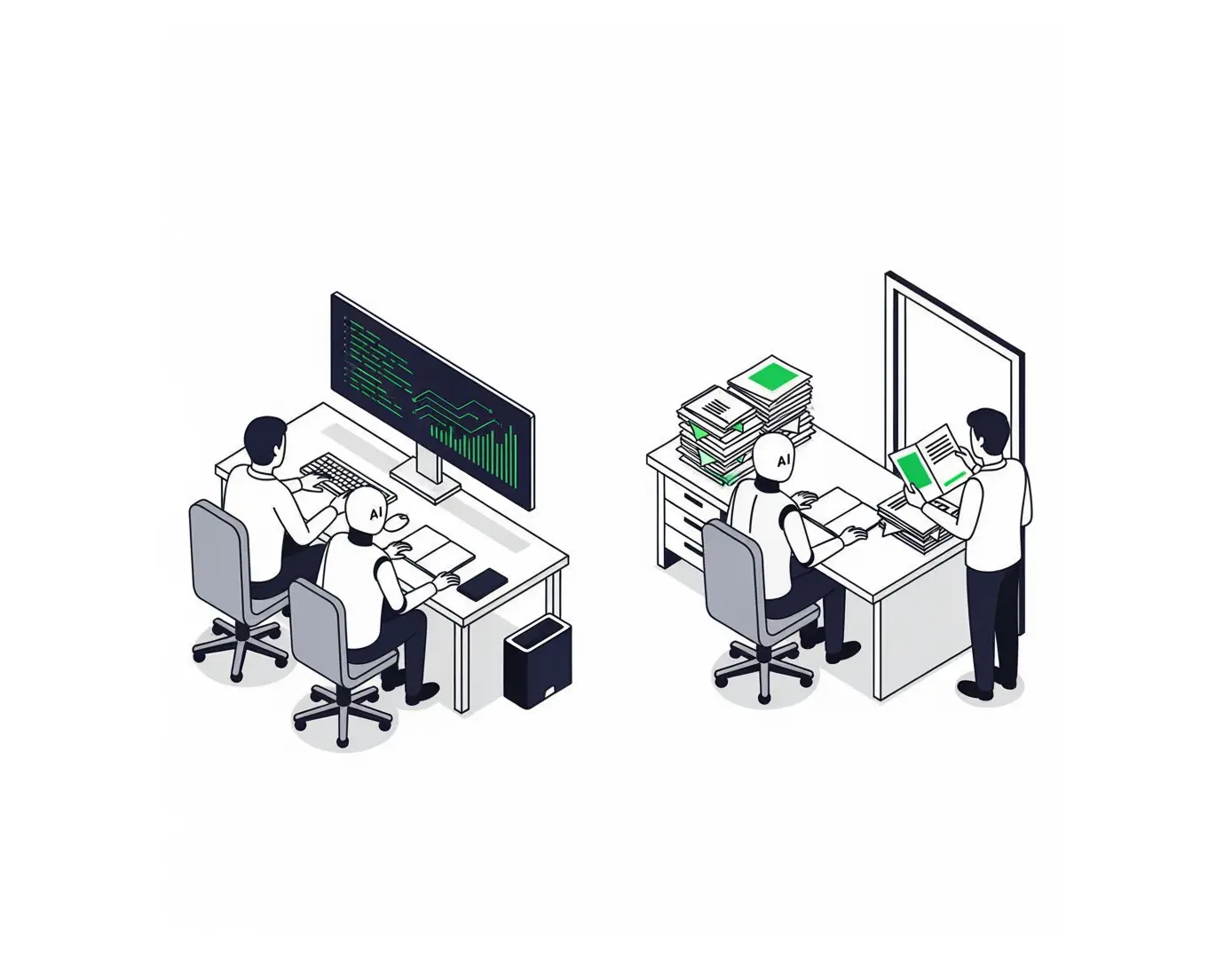
The Central Decision: Agent or Copilot
Before any other term in this layer, this is the one that matters most.
A copilot works alongside your team. It suggests, drafts, and surfaces information — but a human is in control of every decision. The human leads. The AI assists. Think of it as a highly capable person sitting beside your analyst, handing them the right document before they ask, flagging the gap they were about to miss, finishing a paragraph when they pause. The analyst still decides. The copilot makes every decision sharper.
An agent works autonomously. It receives a task, decides how to complete it, takes actions — searching, reading, writing, calling tools — and returns with a result. No human in the middle steps. The human sets the goal and reviews the output. Everything in between belongs to the agent.
The critical distinction: a copilot makes you faster. An agent takes the task off your plate entirely. Both are valuable. Neither is universally right. The question is which one belongs in each specific workflow in your firm.
Now here are all the terms that live in this layer — and how they connect to that central decision.
AI Agent
AI that acts — not just answers.
An AI agent doesn't wait for your next instruction. It receives a goal, plans how to reach it, and executes — searching the web, reading documents, querying a database, sending an output — step by step, without being told each move.
Your firm receives a new client brief for a sector it's researched before. An AI agent assigned to initial research doesn't ask what to do first. It identifies the key questions in the brief, retrieves your firm's prior work from the knowledge base, searches for recent market developments, reads the relevant outputs, and produces a structured research summary — all before a human analyst opens the document. That's an agent.
Think of the difference between a receptionist who hands you a message and a team member you can delegate a full task to. The receptionist passes information. The team member takes the task, handles it start to finish, and comes back when it's done. An AI agent is the second one.
Agentic AI
The mode, not the product.
"Agentic" describes how AI is deployed — not what it is. An AI operating agentically means it's planning and executing multi-step tasks autonomously, without a human checkpoint at each step. An AI that waits for approval between every action is not agentic. An AI that owns a workflow from goal to output is.
Your firm's full research and synthesis process — pulling sources, reviewing prior work, identifying gaps, drafting the output — can run agentically. You provide the client brief and the research parameters. The system plans its own approach, works through it, and delivers a complete draft. You review what it produced. Not every step it took. That's agentic operation: goal in, result out, human oversight at the edges.
Think of an employee operating in fully autonomous mode. You set the goal and the deadline. They own everything in between — the plan, the decisions, the output. You check in at the end. The work happens without you managing each step. That's what agentic means.
Multi-Agent System
A team of AI specialists working in parallel.
Instead of one agent doing everything, a multi-agent system assigns different parts of a workflow to different agents — each specialised in its domain — all working toward a shared outcome. The total output is better than any single agent could produce. It also arrives faster, because the agents work simultaneously rather than sequentially.
Your firm runs three agents on every new client engagement at the same time. One focuses on market landscape and competitive positioning. One handles sector financials and comparable benchmarks. One researches the client's organisation and prior work. Each operates in its domain. The market agent's sizing feeds the financial agent's model. The client research shapes the strategic framing in the final document. The combined output is more thorough than one agent could produce — and arrives in the time it would have taken one agent to do the first task alone.
Think of hiring three specialists instead of one generalist — a market analyst, a financial analyst, a client researcher — all working the same engagement simultaneously. Each brings depth in their lane. The combined work is richer, and they deliver it in parallel.
Orchestration
The coordination layer that makes multi-agent systems actually work.
Orchestration is the system that manages multiple agents — directing which agent does what, in what sequence, how outputs from one get passed to the next, and what happens when something goes wrong. The orchestrator doesn't do the research. It runs the operation.
In your firm's research system, the orchestrator decides the sequence: market agent runs first, financial agent waits for its output before building the benchmarks, both complete before the synthesis agent assembles the final draft. If the market agent hits a gap in the data, the orchestrator decides whether to flag it, retry, or continue with what's available. It is the system's nervous system — invisible when things run well, essential when they don't.
Think of the team lead who assigns the work, sequences the tasks, makes sure each specialist has what they need before they start, and knows when to escalate a problem. You don't manage every agent. You manage the orchestrator — and the orchestrator runs the team.
MCP — Model Context Protocol
The universal connector between agents and tools.
MCP is a standard introduced by Anthropic in 2024 that became the industry standard for connecting AI agents to external tools and data sources. Before MCP, connecting an agent to each tool — your knowledge base, your CRM, a research database, your project management system — required separate custom engineering for each connection. MCP is a universal plug standard: any tool that supports it connects to any agent that supports it, immediately.
Every agent in your firm's research system needs different sources: your internal knowledge base, PitchBook, LinkedIn, your CRM, your document library, your email. Before MCP, each of those connections was a separate engineering project. With MCP, your team builds one connection per tool — and every agent in the system can use all of them. Adding a new data source means adding one MCP integration, not rebuilding every agent.
Think of a universal access card. Without it, every employee needs a separate key for every system — the archive, the database, the client portal. With a universal card, any credentialled employee walks through any door. MCP is that card, for AI agents and the tools they need.
A2A — Agent-to-Agent Protocol
How agents talk to each other across systems.
A2A is an open standard developed by Google that allows AI agents to communicate and pass information directly to each other — even agents built by different teams on different platforms. Where MCP standardises how an agent connects to tools, A2A standardises how agents communicate with each other. As multi-agent systems grow more complex, how agents hand off work becomes as important as what each agent can do.
Your market research agent completes its sector analysis and needs to pass findings directly to the financial benchmarking agent — including confidence levels, data gaps, and three assumptions the financial model should reflect. A2A enables that structured handoff without a human intermediary, without custom integration between the two agents, and without them needing to be built by the same team. One agent speaks. The other listens and acts on what it hears.
Think of the communication protocol between your research and financial teams — the standardised way the market team sends a brief to the finance team, with consistent formatting, flagged priorities, and clear next steps, so finance can act without a meeting. A2A is that protocol, standardised across every agent regardless of who built them.
Agentic RAG
An agent that decides what to retrieve — not just how to use what it's given.
Standard RAG retrieves from a pre-configured set of sources in a pre-defined sequence when triggered. Agentic RAG lets the agent decide what to look up, when to look it up, and which sources to search across — then refine its retrieval based on what it finds. It's the difference between handing your analyst a fixed reading list and hiring one who knows how to research.
When your financial benchmarking agent hits an unusual revenue model it hasn't seen before, it doesn't stop. It decides to retrieve three comparable transactions from your deal database, pull a relevant sector report, and check two recent earnings calls — sources it chose because this specific situation required them. Standard RAG would have searched only what was pre-configured. Agentic RAG makes the retrieval decision itself, calibrated to the problem at hand.
Think of the difference between an analyst given a reading list and one who builds their own research agenda. The first reads what you assigned. The second decides what they need, finds it, and comes back with the right context for the specific question. Agentic RAG is the second.
AI Workflow / AI Pipeline
The operating procedure — made executable.
An AI workflow is the defined sequence of steps an AI system follows to complete a task — from receiving input through retrieval, processing, generation, and delivery. It defines what happens first, what depends on what, where human review sits, and what the final output looks like. When your team says "we're building a pipeline," this is what they mean.
Your firm's research workflow runs: client brief received → agent extracts key questions → knowledge base retrieval runs → market, financial, and client agents run in parallel → orchestrator compiles outputs → synthesis agent drafts the document → partner reviews → final version delivered to client. Every step is defined, sequenced, and automated. The workflow is your firm's research SOP — encoded so the process runs the same way every time, at any volume, with any engagement.
Think of a standard operating procedure your team follows for a repeatable task — clear inputs, defined steps, specific output. The AI workflow is that SOP, made executable. The process runs the same way every time regardless of who's in the office that day.
Copilot
AI that makes your team sharper — without removing them from the work.
A copilot works alongside a human, suggesting, drafting, and surfacing information while the human stays in control of every decision. The human leads. The AI assists. The distinction from an agent: a copilot makes you faster at what you're doing. An agent takes the task off your hands entirely.
Your partners don't hand off strategy development to an agent — that judgment belongs to them. But while a partner is developing a strategic recommendation, the copilot surfaces three comparable prior engagements, flags an assumption in the analysis, drafts the risk section based on the current content, and suggests a framing the partner hadn't considered. The partner still decides. The copilot makes every decision better-informed and faster. That's copilot mode.
Think of a skilled colleague sitting beside you — not doing the work for you, but handing you the right piece of information before you ask for it, flagging the thing you were about to miss, and finishing your sentence when you pause. You're still the one deciding. They make every decision sharper.
Vibe Coding
Building tools by describing what you want — no engineering background needed.
Vibe coding is the practice of building software by describing what you want in plain language and letting AI generate the working code — without writing a line of code yourself. Coined in 2025. For founders, this term signals something important: the cost of building internal tools is dropping fast, and the bottleneck is now imagination, not engineering headcount.
Your operations team wants a research tracker that pulls from your project management system, flags stalled engagements, and sends a weekly digest to partners. Three years ago, that's a six-week engineering project. Today, they describe it in plain language to an AI and it builds the working tool in an afternoon. No engineering ticket. No sprint cycle. No waiting. They described what they needed — and it existed.
Think of telling a builder what you want in plain language — "a room here, with these proportions, connecting to that hallway" — and having them handle all of the technical execution. You don't need to know how to build. You need to know what you want. Vibe coding is narrowing the gap between those who can build software and those who have ideas — fast.
LAM — Large Action Model
AI that operates software the way a human would.
LAMs are AI models trained not just to generate text but to operate software interfaces — clicking buttons, navigating menus, filling forms, extracting data — exactly the way a person with a mouse and keyboard would. Where LLMs read and write, LAMs act inside systems.
PitchBook doesn't expose an API for everything your research team needs. Some data requires navigating the interface — logging in, filtering, clicking through screens, exporting tables. A LAM-powered agent doesn't wait for an API. It opens the application, navigates to the data, extracts it, and passes it to the next step in the workflow — the same way a junior analyst would, but at any hour and without interrupting anyone. Any software interface becomes a source the agent can use.
Think of the difference between a researcher who can only work with data handed to them and one who can sit down at any computer, navigate any application, and retrieve what they need from any system they encounter. LAMs are AI that can do the second. They turn any software interface into a tool the agent can use.
The Operating Model at a Glance
The key decision in this layer is not which agent framework to use. It's knowing where on this spectrum each workflow in your firm belongs.
| Mode | Human involvement | Best for |
|---|---|---|
| Copilot | Human leads, AI assists | Judgment work, senior decisions, client-facing output |
| Agent | AI executes, human reviews the output | Defined, repeatable, research and synthesis tasks |
| Agentic | AI owns end-to-end, human sets goal and reviews | Fully standardised workflows with clear inputs and outputs |
| Multi-Agent | Team of AIs orchestrated, human at the edges | Complex workflows needing parallel, specialised work |
What this layer means for you as a strategic leader: Every workflow in your firm can be mapped onto this spectrum. The question isn't "should we use AI?" — it's "for each workflow, where does human judgment need to stay, and what can move to agent mode?" That mapping exercise, done deliberately across your firm's key workflows, is your AI strategy. Everything else in this series is what makes it possible to execute.
What's Next
You now have the model. The techniques. The operating design.
Part 6 is what happens after it goes live — and it's the layer most founders underestimate until something quietly goes wrong.
How much does this cost to run at scale? How fast does it respond? How do you know when it starts getting worse — before your clients do? How do you catch a problem at 2am instead of finding out about it in a client meeting?
These are not technical questions. They are operational leadership questions. Part 6 gives you eight of them — and explains exactly why they belong on your agenda before you launch, not after.
We Build AI Employees to Work Alongside Your Team
Want to Have a Strategic Discussion?
Book A Discovery CallDon't miss out on an additional 5x to 10x revenue growth and stay ahead of competitors

Your $200K AI Knows Everything — Except Your Business
The difference between a generic AI and one that works like a specialist inside your firm is the techniques you apply. RAG, fine-tuning, guardrails — explained without the jargon.
Feb 18
•8 min read
Previous Article

Week 3: Your AI Started Failing Quietly. Nobody Noticed
Eight questions that tell you whether your AI is actually performing — before a client meeting reveals it isnt.
Feb 18
•7 min read
Next Article